“Where did I send that token?”
Combine token outflow, counterparty, and a rough date instead of scanning every transfer manually.
 Token StudioBack to Home
I built this Solana transaction tracker so you can find a payment, swap, or any other wallet activity without the need for looking at complicated transaction searches in an external explorer.
Open your wallet in Token Studio or enter any public wallet address. Open History and let it fetch its activity. Search the daily timeline or add filters, then tap any result to see what happened, when it happened, and a detailed list of inflows and outflows.
SOL moved between accounts, such as when you pay someone or move funds to another wallet you own.

Tokens moved between accounts. This covers payments in tokens like USDC and transfers between your own wallets.

The wallet received a tiny amount of SOL. This label exists so you can easily ignore those by just scanning the list.

An account was opened, closed, or otherwise managed. For example, a wallet may open an account to hold a new token.

A memo was attached to the transaction. Apps can use these notes for payment references or other short messages.

A blockchain domain name was managed, such as when someone registers a name or changes where it points.

One token was exchanged for another, such as swapping SOL for USDC.

A perpetual futures position or order was managed, such as when a trader opens, adjusts, or closes a position.

A staking position was activated, deactivated, or withdrawn, such as when you delegate SOL to a validator or start unstaking.

The app recognized an action from a mining program.

Assets moved into an account managed by a program, such as when you supply USDC to a lending pool.
Assets moved out of an account managed by a program, such as when you withdraw USDC you supplied to a lending pool.

Assets were borrowed through a lending program, often against collateral posted by the borrower.
A borrower repaid part or all of an outstanding loan.

Tokens were added to or removed from a liquidity pool, where traders can swap between assets.

The wallet collected rewards or other assets it could claim, such as airdrops or even harvesting withheld fees.

A bridge handled the Solana side of a transfer between networks.

New tokens or NFTs were created. This can include adding more units to an existing token’s supply, or printing from a Legacy Master NFT.

Tokens or NFTs were permanently destroyed, reducing the number in circulation.

An asset’s metadata or authorities changed, such as an NFT’s name, image, or other metadata.

The transaction involved an NFT. This label can appear alongside a more specific action like Transfer or Update.

The transaction involved a compressed NFT, whose ownership is recorded in a shared tree instead of a separate account for each item.

An NFT changed hands in exchange for payment.

An NFT listing on Tensor. The Tensor icon shows which marketplace the listing used.

An NFT listing on Mallow. The Mallow icon shows which marketplace the listing used.

An NFT listing on Magic Eden. The Magic Eden icon shows which marketplace the listing used.

The close icon marks a listing that was canceled or removed. It also appears when the app has no marketplace logo for the listing.
An offer to buy an NFT was placed or managed. A marketplace transaction can also cancel an existing offer.

A compressed asset was converted to its regular form.

Another address was granted permission to act on an asset or account, such as permission to move a set amount of tokens.
A previously granted permission was removed. For example, a wallet owner can revoke an app’s permission to move tokens.

The transaction involved a shared wallet or its approval process, such as when someone proposes or approves an action.

Excess SOL reserved to keep an account open was recovered while the account itself stayed open.

An address lookup table was activated, deactivated, or closed. These tables help transactions refer to many addresses compactly.

A tree that holds records for compressed assets was created or managed. Compressed NFTs use trees like these.

A program was deployed to Solana or an existing program was updated.

A nonce account was managed. These accounts allow transactions to be prepared and signed for later submission.

The transaction used a privacy feature, such as a confidential transfer.
The transaction called a program and the app had no more specific label for the action.
Each time you change your search or filters, the chart redraws using only the active matches. The graph also shows daily value changes, a seven-day moving average, and a running total. Tap a day to jump straight to its activity.
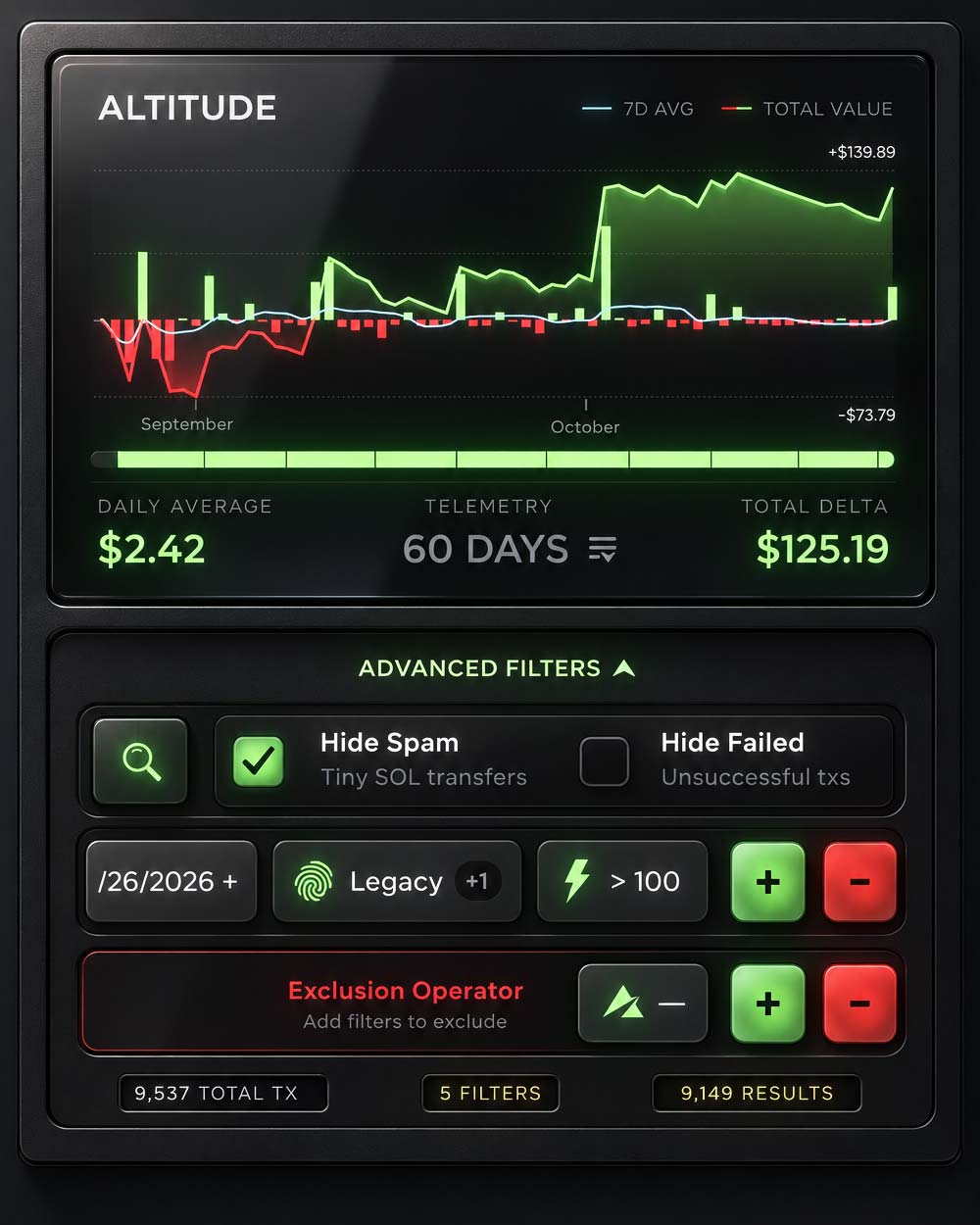
I come from procedural 3D modeling, where I build complex scenes by connecting small, reusable pieces. I took the same approach with the transaction filtering because it felt right for a phone: you add only the rules you need, and those are the only ones taking up space. The list, chart, totals, and match count all update together.
Combine token outflow, counterparty, and a rough date instead of scanning every transfer manually.
Filter swaps and wallet value changes, then let the graph and totals recalculate from only the matching activity.
Filter by direct or reached program, instruction, fees, signer, or wallet relationship.
Search a specific address lookup table and inspect the transaction version, accounts, and compute usage.
Tap any result to see who signed, what moved in and out, where it went, and what it cost. Open the list of programs involved to see each instruction they invoked.
See whether it succeeded, who signed it, which version it used, and how much computing work it requested and actually used (compute units). You can also inspect the address lookup tables, programs, and individual instructions.
Review SOL and token changes, source and destination accounts, counterparties, network fees, priority fees, and estimated USD changes.
Copy an address or open it directly in Token Studio's public wallet viewer without connecting it. For example, tap a transfer recipient to inspect their wallet and look for where the funds went next.
| Access | Transaction limit | History window |
|---|---|---|
| Standard | 16,000 | 30 days |
| Token Time Vault collector | 128,000 | 90 days |
Automatically backfill the available transaction history as a paid convenience operation. The current Token Studio service fee is 0.01 SOL.
Refresh locally stored transaction metadata when classifications or supporting data need to be rebuilt. Current service fee: 0.001 SOL.
Erase the wallet's local Flight History recording from the device. Current service fee: 0.001 SOL. Ordinary incremental history use remains available without the Black Box convenience fee.
Yes. Search and the Transfer Counterparty property can isolate activity involving an address. The result can be copied or opened as a public wallet address without connecting it.
Yes. The transaction list, graph, total value change, daily average, and matching count are calculated from the active result set.
No. The current standard tier covers up to 16,000 transactions and 30 days; collector access covers up to 128,000 transactions and 90 days. Network availability and gaps can also affect coverage. Transactions exceeding the maximum timeframe are pruned periodically.
No. It is wallet analysis based on the currently available pricing. It should not be treated as authoritative tax or accounting data.
Flight History stores its parsed database locally on the device. Solana RPC and pricing sources are still contacted to fetch public blockchain and market data.
Download the record, combine the filters, and move from a graph anomaly to the exact instruction that caused it.